
Home > How do I adjust the time before the proactive chat window automatically closes?
Categories: Proactive Chat | JavaScript API
(Last Updated On: July 27, 2021)
About this Article-
This article goes over how to programmatically set an auto close delay for proactive chat.
Awesome proactive chat engagement is something that we pride ourselves in here at SnapEngage. However, when we implemented the proactive chat feature, we went off the assumption that if a visitor wasn’t called to action within a minute or two, they probably weren’t interested in initiating a chat, and consequently, we programmed the proactive chat window to automatically disappear. We know that it may take some people longer to respond to these proactive invites, because sometimes other things come up while they are looking at your site.
Since proactive chat is such a powerful conversion tool, we have implemented the option to extend the time before the window goes away, or you can set it to never auto-close.
You can delay the auto-close simply by adding one line of Javascript to your widget code. That javascript code is as follows…
SnapEngage.setProactiveAutocloseDelay();
Now, in the parenthesis at the end, specify a numeric value that will represent the amount of time in minutes. This number will be applied, closing the proactive chat window at the time indicated.
For example, if you want the window to display for one hour, you would enter 60 in the parenthesis:
SnapEngage.setProactiveAutocloseDelay(60);
If you never want the window to automatically close, enter a 0 in for the value:
SnapEngage.setProactiveAutocloseDelay(0);
Decimals can also be used, for instance, for 30 seconds or half a minute, enter a 0.5 in for the value:
SnapEngage.setProactiveAutocloseDelay(0.5);
Then, add the SnapEngage.setProactiveAutocloseDelay(); parameter to the JavaScript code from the Get The Code tab -> Advanced section and re-paste this code to your website:
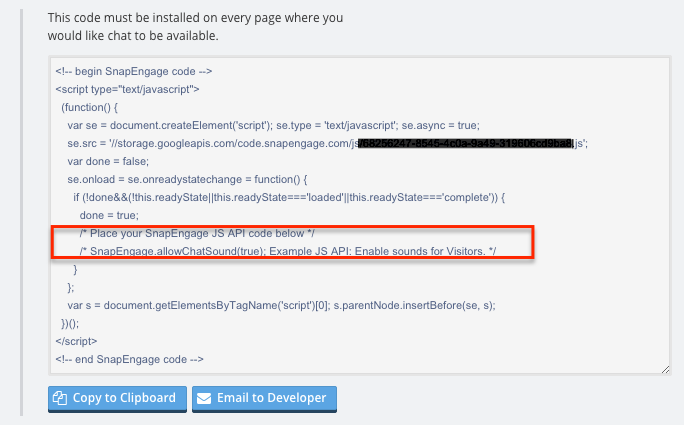
And, easy as that, you’re done! Now you won’t miss the opportunity to [proactively] engage that Fortune 500 company who is so enthralled by your snazzy live chat solution that, in the heat of the moment, offers to buy out your startup for $16 million dollars – You can thank us later.
Did you find this article helpful?

 (4 votes, average: 4.25 out of 5)
 Loading ...
Published July 28, 2012
Reader Feedback
No comments yet