
Home > Live Chat Guided Browsing
Categories: Chat Agent Docs | Tips & Tricks
(Last Updated On: July 28, 2021)
About This Article
This article will cover the Guided Browsing feature that redirects the visitors page while in a chat.
Chat agents can use the Guided Browsing feature to redirect the visitors page while in a chat. To redirect them to a different URL the chat agent can use the /goto command. If your SnapEngage JavaScript is installed on the target page too, the current chat will stay open.
How to use the Guided Browsing feature:
You can use this command by either entering the whole URL like this:
\goto http://www.snapengage.com/live-chat-integrations/
Or if not you you can use a relative path of your domain:
\goto /features
An even faster way to redirect the visitor is by using shortcuts. You can define a rule in the Settings > Agent Settings > Shortcuts tab of the Admin Dashboard for example:
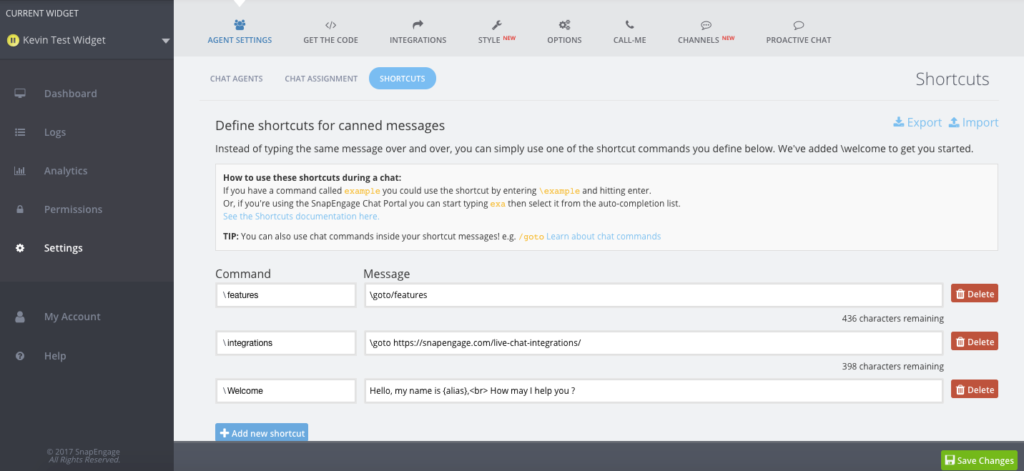
In this case, you just have to enter \goto in the chat, and redirect the visitor to the page you want him on.
Sample Guided Browsing:
Here is an example of how a chat agent can use the Guided Browsing feature while in a chat:
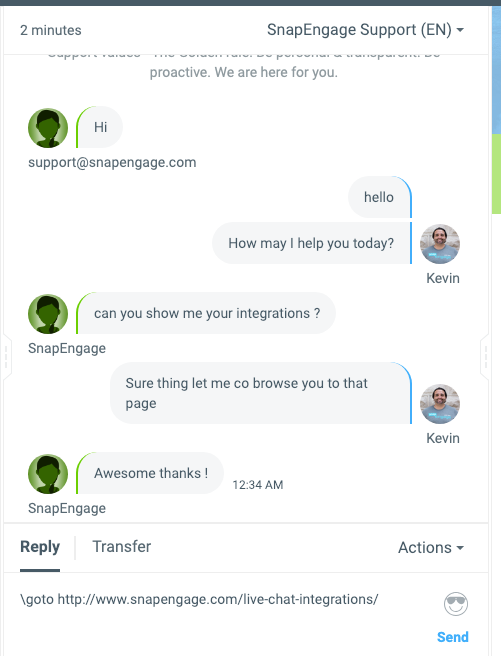
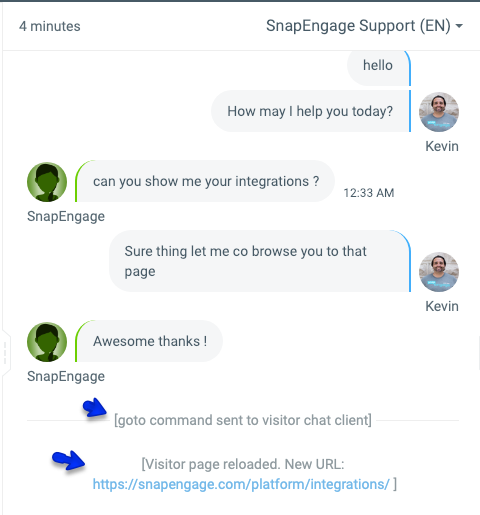
After including the \goto command and the whole URL as seen in the example above to use Guided Browsing with the visitor, the chat agent can then press enter. At this point the chat agent will see that their visitor is on the page they were sent to with a system message in the Conversations Hub:
Did you find this article helpful?

 (57 votes, average: 4.26 out of 5)
 Loading ...
Published January 11, 2012