
Home > Proactive Chat URL Rules
Categories: Getting Started | Proactive Chat
(Last Updated On: August 3, 2021)
About This Article
The purpose of this article is to provide a comprehensive overview of different ways to configure your Proactive Chat v2 using our URL rules
- “contains“/”does not contain” – our basic rule which will work for most users in most cases
- “begins with“/”ends with” – our moderate level rule which requires some extra care
- “is“/”is not” – our advanced level rule which is the most restrictive.
The Default / Catch-All Rule
The way to create a rule that will work for all URLs is to use the URL format:
http*://*
(Note: not http*://*yourdomain.com, only http*://* ) The asterisk character (*) is a catch-all that stands for all other characters.
If you are planning on using the catch-all URL, you may consider using another type of rule. This is a hold-over from our old Proactive Chat rules, and with the new version of Proactive Chat there are many new and exciting rule types available for your use!
Using the “Contains” and “Does Not Contain” Rule (Basic)
Using the “Contains” rule is the easiest way to capture most URLs containing a relative path. For instance, let’s say you have a URL like the following:
Using the Proactive URL rule “contains” with the “sales” part of the URL will capture this page.

It will also capture any other pages under the sales directory. For example, these pages will also be captured using the rule shown above:
http://yourdomain.com/sales/index.html
http://www.yourdomain.com/sales/products.html
http://www.yourdomain.com/sales/team.html
http://www.yourdomain.com/sales/affiliate.htmlhttp://sales.yourdomain.com/
http://www.yourdomain.com/about/oursalesteam.html
Oops! As you can see, we capture a few URLs in there that we might not intend to! To exclude the subdomain sales.yourdomain.com and /about/oursalesteam.html, we can change the rule to be “contains” and use “/sales/“, as shown here:

Now, the URLs captured by this rule have changed. The ones struck through will no longer apply under this rule:
http://yourdomain.com/sales/index.html
http://www.yourdomain.com/sales/products.html
http://www.yourdomain.com/sales/team.html
http://www.yourdomain.com/sales/affiliate.html
http://sales.yourdomain.com/
http://www.yourdomain.com/about/oursalesteam.html
Great! That’s much better. But, let’s assume affiliate.html links to your affiliate program, and you really want to have an entirely different rule for that page. You can exclude affiliate.html from the previous rule by adding a “does not contain” rule. To do this, simply hit the big green + next to your existing URL rule to add a new rule. Choose again, “Page URL” and this time select “does not contain” and specify enough of the URL to exclude the page you don’t want. In this case, I will use “affiliate” as the exclusion term (since we already know we are in the /sales/ directory and in the future I may move affiliate to its own sub-directory). You could just as easily use affiliate.html (the exact page name) /sales/affiliate.html, I simply chose the shortest portion of the URL which is distinct. Here is what my exclusion rule looks like, in combination with my previous rule:

Using the “Begins With” and “Ends With” Rule (Moderate)
The “Begins With” and “Ends With” URL rules look at the entire, fully-formed URL. Note: The URL will always have the http:// or https:// on the front end, and each are distinct. You will need to consider this when formulating your “Begins With” rule. If, for your Proactive rule, http and https should be treated the same, you will want to use a wildcard (*) in place of the s.
“Begins With”
Let’s take a look at some examples! We’re going to look at the “Begins With” rule first. Imagine that you have the following URLs on your site:
http://help.yourdomain.com/
https://help.yourdomain.com/
http://helpkoalas.yourdomain.com/http://www.yourdomain.com/
http://sales.yourdomain.com/
You want to isolate the Proactive Rule to your help subdomain. You could use the “Begins With” URL rule with the URL fragment http://help – The URLs captured by this rule are listed below (the ones not captured are struck-through):
http://help.yourdomain.com/
https://help.yourdomain.com/
http://helpkoalas.yourdomain.com/
http://www.yourdomain.com/
http://sales.yourdomain.com/
Oops! I actually wanted everything on help subdomain, but this rule has excluded anything using https and it has also included the helpkoalas subdomain, which I don’t want. To fix this, I am going to use http*://help. as my new URL fragment. The . at the end will exclude the helpkoalas subdomain, and the * after http will optionally include the s, if my visitor is using secured browsing. Here is what my rule looks like now:  And it will capture the following URLs:
http://help.yourdomain.com/
https://help.yourdomain.com/
http://helpkoalas.yourdomain.com/
http://www.yourdomain.com/
http://sales.yourdomain.com/
Additionally, if you have your code installed on theirdomain.com and ourdomain.com, the following URLs will also be captured by this rule:
http://help.yourdomain.com
http://help.theirdomain.com
http://help.ourdomain.com
“Ends With”
The “Ends With” URL rule for Proactive Chat approaches the fully-formed URL from the other end. You can use “ends with” and “affiliate.html” to capture the following URL:
http://www.yourdomain.com/sales/affiliate.html
You can use “ends with” to capture URL parameters as well. For instance, you may have a URL like the following:
http://www.yourdomain.com/products.php?category=17
You can set a proactive chat for this URL using “ends with” and “category=17” or “products.php?category=17” if category 17 isn’t specific enough. In many cases you can also capture this information with a “contains” rule. Note: The order is important here! Using a rule “ends with” and “category=17” will file if your URL looks like like the following:
http://www.yourdomain.com/products.php?itemID=121&category=17
However, if the order of your URL parameters is reversed, like below, it will not fire, because your fragment is no longer at the very end of the :
http://www.yourdomain.com/products.php?category=17&itemID=121
“Begins With” and “Ends With” require exact order and placement to work.
Using the “Is” and “Is Not” Rule (Advanced)
The “is” and “is not” URL rules allow you to specify exact and complete URLs for your Proactive Chat triggers. This is the most unforgiving rule to use.
If you want individual messages on certain matching URLs you should take care not to unintentionally exclude pages. For example, if you specify a message on page URL “is” matching:
http://www.yourdomain.com/sales
the Proactive Chat will not appear if your domain also works without the www. prefix (it usually does), and your visitor is on the URL:
http://yourdomain.com/sales
So we recommend the * character to include variant URL prefixes or suffixes. This is an example how to set up the rule to include all eventualities:
http*://*/sales*
This way, your Proactive Chat will be activated on both http and https sites, subdomains and sub-directories and/or session ID specific pages. For this specific example, it would be easier to use a “contains” “/sales” rule.
The “is” rule has a lot of power when you have very specific URLs that you need to nail down a rule for or you know your way around constructing an expression with wildcards that will capture your pages. In most cases, using a “contains” rule is preferable unless you absolutely need an “is.” The same applies for “is not” and “does not contain.”
Points of Confusion
We realize Proactive Chat rules can get confusing and frustrating when they don’t work! This section is designed to help you learn about common difficulties encountered when setting up Proactive Rules, in order to avoid them!
Order is Important!
All things being equal, the rules at the top of the list are more important, and thus will fire first. For this reason, your catch-all rule (if you are using one) should always be at the bottom.
If you have two rules that can apply to a trigger and are seeing the message for the “wrong rule” – try changing the order of these rules. To move a rule, simply click on the :: area (1) on the left side of the rule and drag it to the position you want.
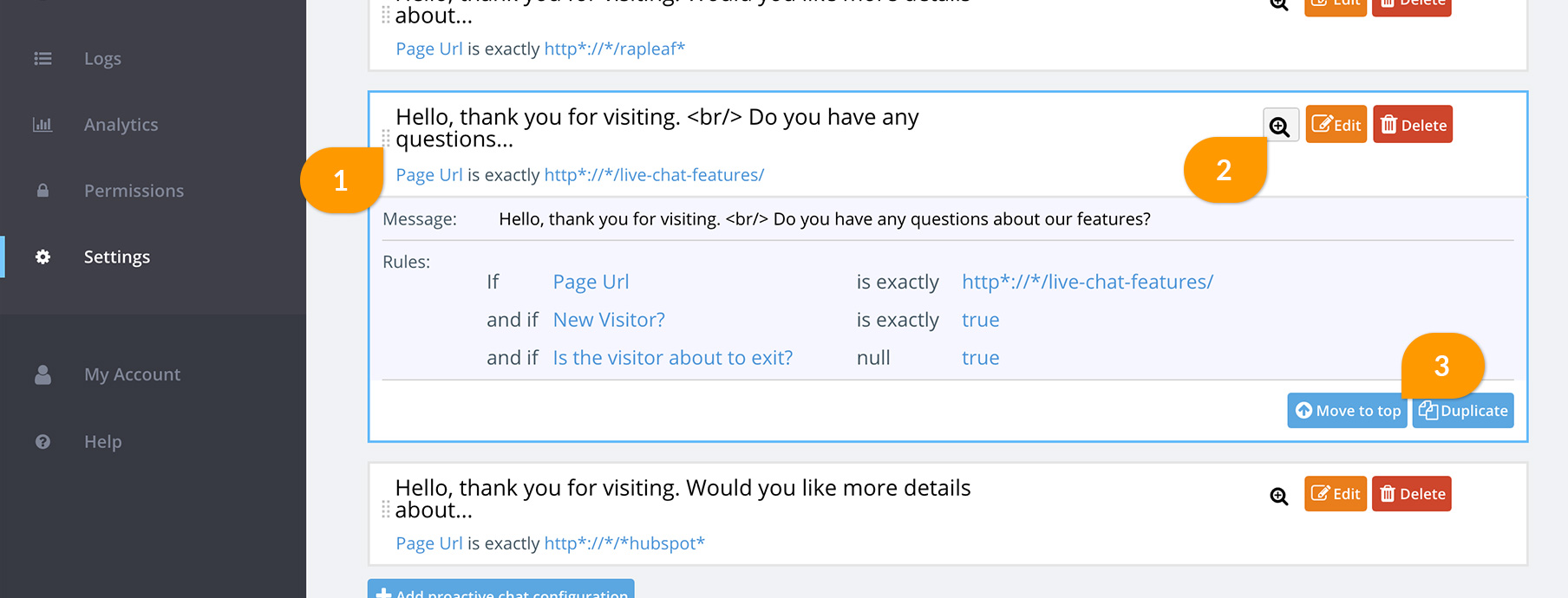
You can quickly move a rule to the top of the list using the “Move to top” button. Simply click the magnifier icon (2) to expand the rule and then the “move to top” button (3)
The Fastest Rule goes First
If you have two rules that can apply to a trigger – one is set to fire after 15 seconds and is at the bottom of the list, the other is set to 35 seconds at the top of the list. The 15 second rule will always fire.
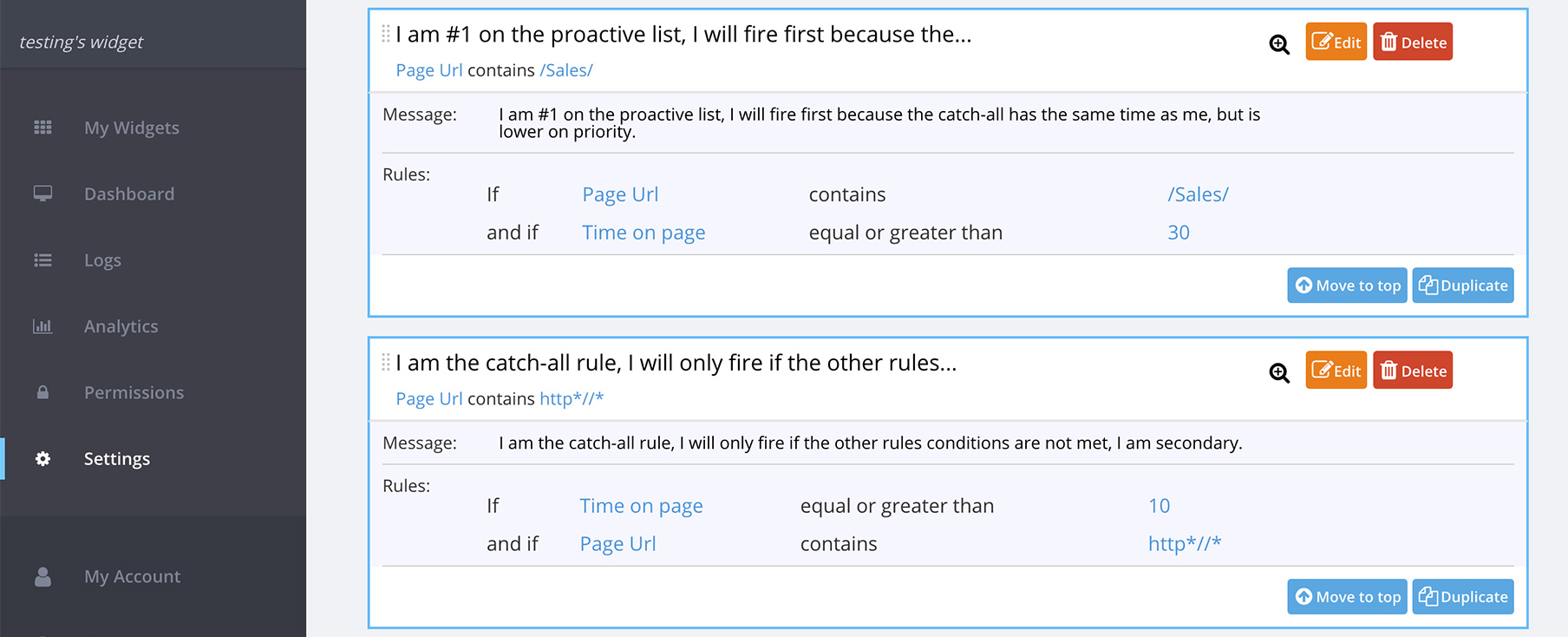
In many cases, this conflict is attributed to having a catch-all rule in place at a faster time than a more restrictive rule. If you are using the catch-all rule, you should consider creating a more meaningful URL “contains” rule or simply removing the URL portion of the rule to create a solely time-based rule.
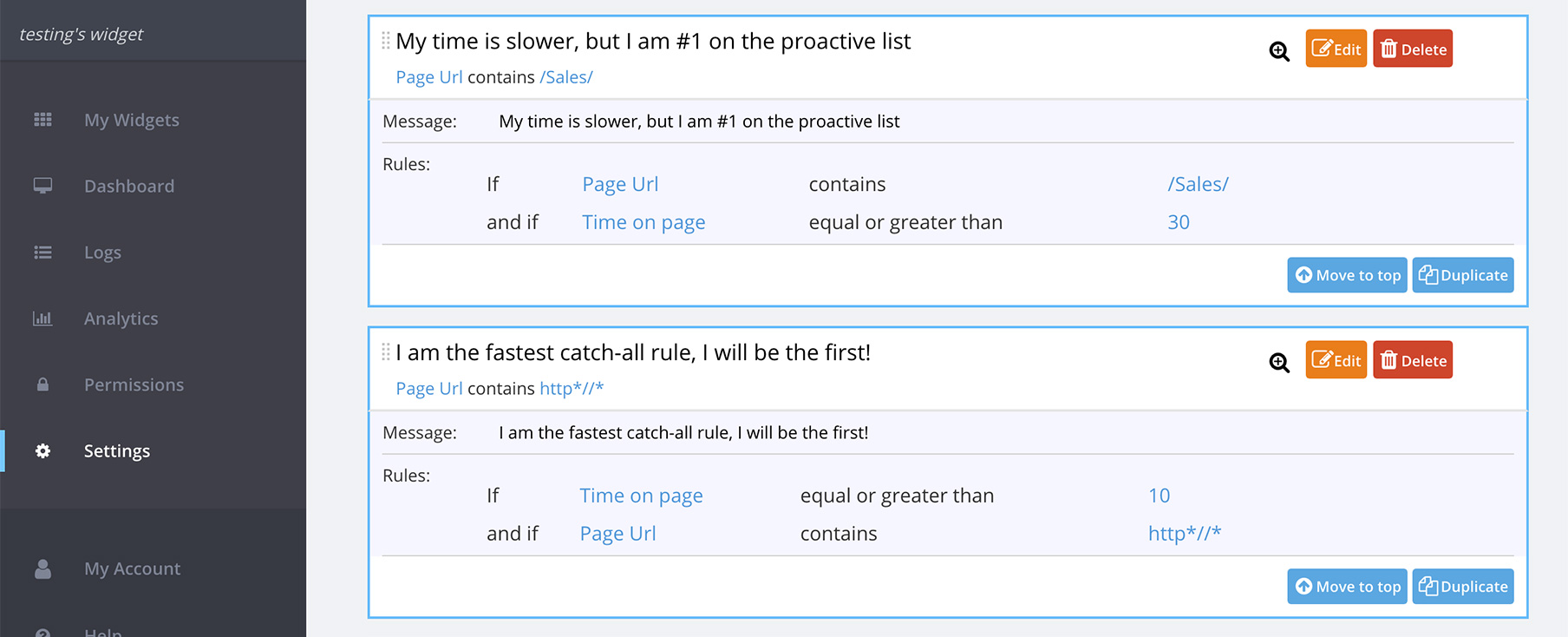
These rules should be revised as follows, in order to function as expected:
Restrictive “contains” Rules
Remember that for a “contains” rule, you need to be more general. Often there are overly-restrictive “contains” rules in the rule list. Here’s an example of a rule that can be simplified:
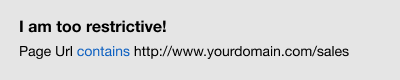
This rule will NOT fire if…
- Your visitor is using https
- Your visitor is on the URL as http://yourdomain.com/sales (no www.)
Here is how to simplify this rule:

General “is” Rules
Remember that for an “is” rule you need to be exactly specific. Often there are overly general rules that do not actually capture the pages.

In this case, my rule will only fire if I go to:
http://www.yourdomain.com/sales/
https://www.yourdomain.com/sales/
It will NOT fire if I go to any of the following:
http://yourdomain.com/sales
http://www.yourdomain.com/sales/index.html
http://www.yourdomain.com/sales/products.php
http://www.yourdomain.com/sales?category=17
In most cases you should consider switching to a “contains” rule if you are using an “is” rule. If you feel confident that “is” is right for you, here is how to fix this rule so it will fire when visiting ONLY the sales directory, excluding any pages in that directory.

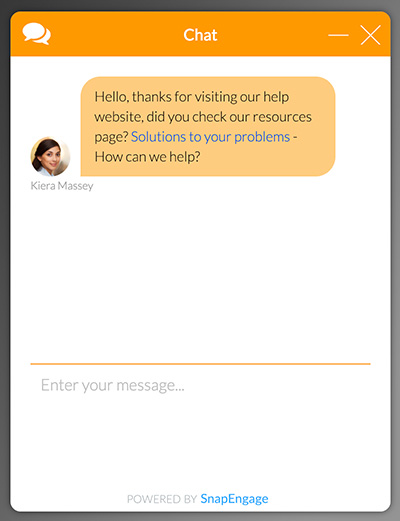
Be aware you can also add hyperlinks on your proactive message :
Hello, thanks for visiting our help website, did you check our resources page? <a href=”https://www.resourcespage.com” target=”_blank”>Solutions to your problems</a> – How can we help?
Did you find this article helpful?

 (20 votes, average: 4.35 out of 5)
 Loading ...
Published February 26, 2012